Friday, February 8, 2008

Cisco Nexus 7000 - Deliver Lossless Ethernet


Cisco Nexus 7000 is the first product in history that support Lossless Ethernet. This is really a breakthrough in Ethernet technology, because one key element that makes Ethernet was so fast is that Ethernet is allowed to drop packet to achive higher speed during data transmission. So dropping packet is really an Ethernet's nature.

There is another technology called Fiber Channel switching, that normally is used in SAN (Storage Area Network). Different with Ethernet, Fiber Channel does not drop packet by using many advanced technology. Packet drop, even very few, could cause data corruption during data replication process.

Cisco manages to combine the best of both world : The Speedy Ethernet with The Safe Fiber Channel, which results in Lossless Ethernet. The design took 4 years from scratch, combining Cisco knowledge & experience in Ethernet and Fiber Channel.

Lossless Ethernet is the key element in Data Center 3.0 "Unified Fabric" that enable Server, Storage, and Networking protocols running in one fabric.

The current release of Nexus 7000 support Gigabit Ethernet and 10 GE (max 512 port 10 GE is supported in one chassis today). And support for Fiber Channel will be via FCoE (Fiber Channel over Ethernet) some time in the future.

Cisco Nexus 7000 - Virtual Device Contexts

One aspect why Nexus 7000 is very different with Catalyst or MDS families, is that Nexus designed with Virtualization from the start.

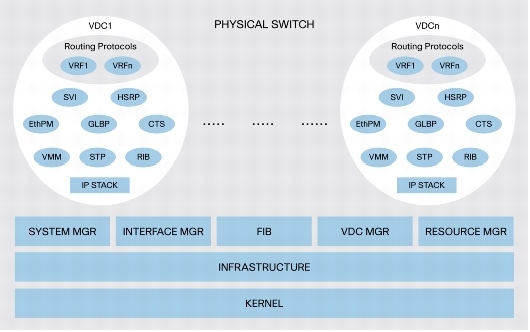
Virtualization in Nexus is called VDC (Virtual Device Contexts), its hardware level virtualization, very similar with hypervisor based virtualization. VDC is the 'virtual machine' and it is representing one unit of virtualized Nexus 7000 - it has its own routing protocol, switching process, configuration, administrator, physical ports, hardware data plane and management plane.


The virtualization concept in networking device is not new. Cisco IOS XR that run on Cisco CRS-1 and GSR also support similar virtualization. All of them gives the following benefits :
  • VDC allows the user to use their own virtual context safely, without impacting other user (on different VDC)
  • Each VDC can have different administrator. This may be not common, but sometime is necessary for specific requirement, i.e. for testing or training purpose. The administrator from one VDC will be completely separated with the others, so he/she can not cause any damage to different VDC
  • Allow easier migration or consolidation from old network to new network with different department or policy
  • Very useful for training/testing purpose, since we could just define some VDC for that purpose to avoid buying new/used equipment
In the service provider area, VDC concept also very powerful. With VDC we could create a fully automated virtual data center easily, and have it assigned to different customers.

Click here for more detailed information on Cisco Nexus 7000

The Next Generation Data Center - Cisco Data Center 3.0

Data Center Focus
Like most of you, I've never heard of Data Center 1.0 or 2.0 either, but according to Jayshree Ullal, Cisco senior vice president of the Datacenter, Switching and Security Technology Group : "Cisco’s Data Center 1.0 and 2.0 strategies focused on data center consolidation, 3.0 targets virtualization and automation".

Data Center 3.0 = Server + Storage + Network Virtualization
Data Center 3.0 built to support modern and anticipate future applications such as social networking, crowd mass collaboration, etc., based on consolidation and virtualization trend for the sake of green computing...

Aimed at optimizing application performance, service levels, efficiency and collaboration, Data Center 3.0 fabric's provides real-time, dynamic orchestration of infrastructure services from shared pools of virtualized server, storage and network resources.

Data Center 3.0 Components
  1. VFrame Data Center Orchestration Platform - Runs on Linux Red Hat server, Vframe provisions resources together as virtual services. VFrame provisions the compute, networking and storage resources via open Web API.
  2. WAAS (Wide Area Application Services) - Application Delivery to increase application performance on slow WAN links.
  3. ACE XML Gateway - It brings application intelligence into the network and enables efficient deployment of secure, reliable, and accelerated Web service environments based on XML (Extensible Markup Language) and SOAP (Simple Object Access Protocol) using a shared, network infrastructure.
  4. SAN switches - provides Fiber Channel, Ethernet, FICON, etc. , available Cisco MDS SAN switches family
  5. Data Mobility Manager - is a software feature for the MDS 9000 SSM (Storage Services Module) that enables movement of blocks of data from a source device to a destination device. Such movement is typically needed to address array lease expiration events, capacity planning and implementation of tiered storage strategies.
  6. Storage Media Encryption (SME), available on the Cisco MDS 9000 family switches and Cisco Fabric Manager, encrypts data at rest on heterogeneous tape devices and virtual tape libraries. This software enable highly available encryption services to be deployed and managed without rewiring or reconfiguring storage area networks (SANs), or installing additional software.
  7. Nexus 7000 series - this is the nexus (center) of the Data Center 3.0 with switch fabric capacity up to 15 Tbps. Currently it supports high density GE and 10 GE interfaces with roadmap to 40 G and 100 Gigabit Ethernet. Nexus 7000 operating systems's is NX-OS that combines SAN-OS (MDS's operating system) and Multilayer Switching capability. One of Nexus 7000's unique feature is Virtual Device Context (each virtual device runs with its own process)

Sunday, February 3, 2008

Time Based Job Scheduling with Cron

Cron is a time based scheduling service available in Unix and its variant. Cron was derived from Greek language "chronos" that means time.

In Ubuntu, cron is multi user, and every user in the system could schedule any job using cron with simple command "crontab -e". This command will invoke the default text editor to add/remove new job.

Below is one example in which I want to ask my computer to reindex my hard disk content using recoll (via "recollindex" command line) every 2:00AM every day, and log every single message to "/tmp/cron-recollindex" :
crontab -e
0 2 * * * recollindex > /tmp/cron-recollindex 2>&1

In Ubuntu crontab -e will invoke nano. To change it with your favorite editor, use the following command (just replace "vi" with your favorite one) :

EDITOR=vi && crontab -e
If you want a permanent changes on the editor, put the following line inside your .bashrc file :

export EDITOR=vi